

Short answer: “Royalty-free” means you don’t pay a fee every time the music is used. It does not mean the music has no copyright. Someone still owns it, and that owner can register the recording with YouTube’s Content ID system. When Content ID recognises the music in your video, it files a claim — even if you had every right to use the track. A claim is not a strike. It does not put your channel at risk, and in most cases it takes a few minutes to resolve.
If you have ever downloaded a track from a free music site, uploaded your video, and then watched a copyright claim appear anyway, you are not doing anything wrong. The system is working exactly as designed. It is just designed for a different problem than the one you have.
On this page
Just here for the music? Everything on Unminus is free to download and use commercially, with no attribution and no account. Browse by mood: calm, happy, cool, motivation.
Four terms that sound similar and mean completely different things. Once you can tell them apart, the rest makes sense.
| Term | What it means | What it does not mean |
|---|---|---|
| Royalty-free | You pay once, or nothing at all, instead of a fee per use. | That nobody owns the copyright. Someone still does. |
| Copyright-free | Usually marketing language. Almost nothing is genuinely free of copyright. | A legal category. It is not one. |
| Public domain | Copyright has expired or was waived. Genuinely ownerless. | That a specific recording is free. A new recording of a 200-year-old piece has its own copyright. |
| Creative Commons | A licence with conditions, often requiring credit. | No rules. CC licences have rules, and breaking them breaks the licence. |
The gap between “royalty-free” and “copyright-free” is where nearly every claim story begins. A track can be free, legal for you to use, and still owned by someone who has registered it with YouTube.
This is the most common reason, and the one almost nobody mentions on their pricing page.
Many music libraries register their catalogue with Content ID on purpose. It lets them see where their music is being used, and it lets them collect revenue from videos that use it. That is a legitimate business model.
There is a second motive that libraries rarely explain, and it is the more important one: if you do not register your own recordings, somebody else can. Content ID gives the match to whoever registered the audio, not to whoever actually made it. A stranger who uploads a track they had nothing to do with can end up claiming — and collecting on — every video that uses it. Registering defensively is the only way a library can keep control of its own catalogue.
The awkward part is that the system cannot tell the difference between someone who downloaded the track properly and someone who did not. Everyone gets claimed. Paying customers included.
Some libraries solve this by whitelisting your channel — but only if you are on a paid plan. Others simply do not talk about it.
Content ID matches audio fingerprints. If someone uploads a track they do not own and registers it as their own, their claim can land on your video even though you did nothing wrong. This happens often enough that YouTube has a dispute process built specifically for it.
It is frustrating, but it is also the easiest kind of claim to get removed, because the claimant has no real basis.
A remix, a cover, a re-upload, or a track that samples something else. The licence you read covered one recording; the file you downloaded was another. Content ID matched the one it knows.
Worth checking before you dispute: where exactly did the file come from, and does that source name the same artist and title as the licence you are relying on?
Content ID is YouTube’s automated matching system. Rights holders upload reference files — the audio or video they own — and YouTube scans uploads against that library. When it finds a match, it applies whatever policy the rights holder chose.
There are three policies. The rights holder picks one:
Nothing here involves a human looking at your video. It is pattern matching, running at the scale of millions of uploads. That is why a claim is not an accusation. It is a machine reporting a match.
This is the single most useful thing to understand, because the fear attached to the word “copyright” is usually fear of the wrong thing.
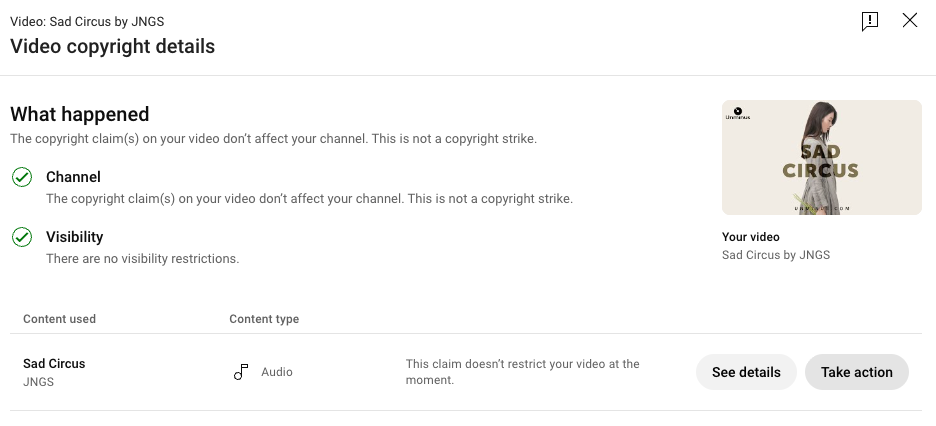
| Content ID claim | Copyright strike | |
|---|---|---|
| Triggered by | Automated match | A legal removal request from a person or company |
| Effect on your channel | None | Serious. Three strikes and the channel is removed. |
| Effect on the video | Usually stays up; revenue may go elsewhere | Taken down |
| How common | Extremely | Rare |
| How to resolve | Dispute inside YouTube Studio | Retraction, expiry, or counter-notification |
If you see the word “claim” in YouTube Studio, your channel is fine. Take a breath, then deal with it.
Copy this into the dispute box
This video uses music from Unminus (unminus.com), which is licensed for commercial use with no attribution required. The licence is published at unminus.com/license. The whitelisting keyword from unminus.com/claim is in the video description.
Swap in your own source if the track came from somewhere else. Keep it factual and name the licence — nobody at the other end is reading an essay.
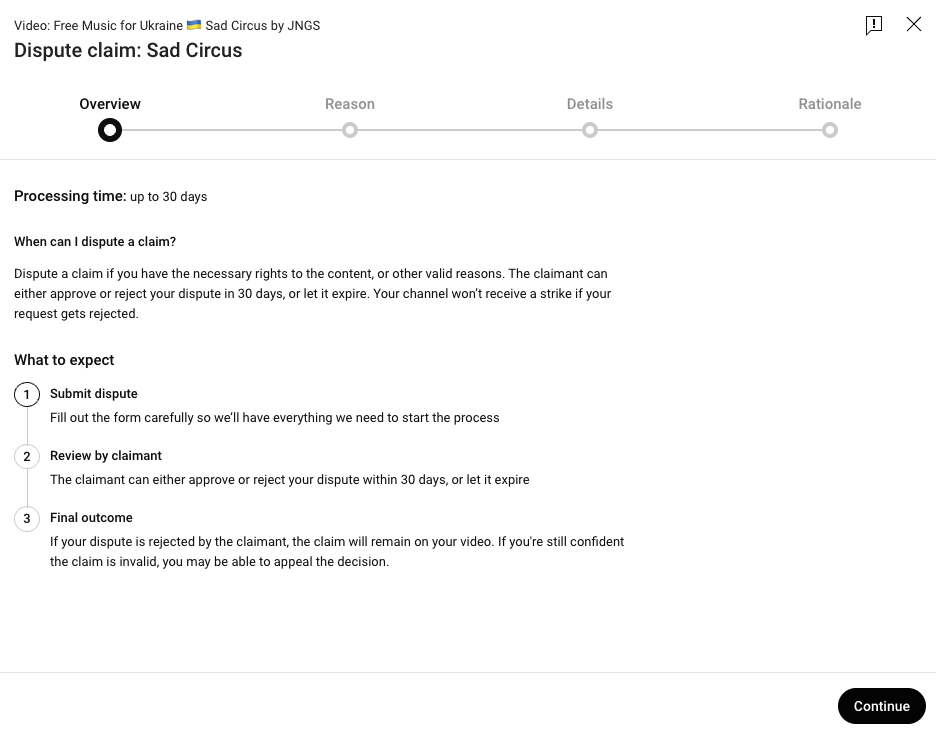
One thing worth saying plainly: disputing a claim you genuinely have the right to dispute carries no risk to your channel. The risk only appears if you dispute music you have no licence for, and the claimant escalates.
Live streaming is a different system, and this is where a lot of bad advice circulates.
Content ID is a YouTube mechanism. It does not apply to Twitch or Kick. Those platforms respond to DMCA takedown notices instead, which come from a rights holder, not from an automated match — and they mostly affect saved VODs and clips rather than the live stream itself.
What that means in practice: no music library can promise you a stream is safe, because no library controls what a third party might file. Anyone telling you their tracks are “DMCA-free” is selling you a phrase, not a protection.
What actually helps is boring and effective. Use music from a source that names its licence clearly. Keep the download page or licence link saved somewhere you can find it in two minutes. If a VOD gets muted, you will have what you need.
We run a free music library, so it would be convenient to skip this section. Here is the honest version, including how we ended up here.
We did not start with Content ID. For the first years, Unminus was exactly what it sounds like: free tracks, no account, nothing in between, and no claims. That was the entire idea, and it worked.
Then it stopped working. Other people started uploading our artists’ tracks to YouTube and registering the recordings as their own. Once a stranger has registered a recording, everyone using it legitimately gets claimed — including the creators who had downloaded it from us, properly and for free. We heard from people whose videos were claimed over music we had given away, and there was nothing we could do about it. Music we had published to be used freely had become music our own users could no longer use on YouTube.
So we registered the catalogue ourselves. When the recording is registered to us, a match produces our claim instead of a stranger’s — and a claim we hold is a claim we can release. That is the part that matters if you are reading this because of a claim.
It is also true that the system pays out on some of that use, and that money goes back to the artists. Both things are real. We would rather say so than tell you only the flattering half.
What we do about claims is set out on our claim page:
Our licence requires no attribution and permits commercial use. We mention that here because the two things people usually want to know are whether they can use the music and what happens on YouTube — and the answers should not be buried.
We would rather not need any of this. If it becomes possible again for a free library to stay unregistered without someone else claiming its music, we will go back to that gladly. Until then, this is what keeps the tracks usable for the people we made them for.
For context on scale: the catalogue has been downloaded more than 100,000 times. Every track was chosen by a person, one at a time.
Royalty-free is a pricing term, not a copyright status. Claims are automated matches, not accusations. A claim is not a strike, and your channel is not in danger. Most claims are resolved in minutes if you know where to look.
And when you are choosing where to get music, the useful question is not whether you will ever get a claim — no honest library can promise that. The useful question is: if a claim appears, does this library tell me exactly how to clear it, without asking me to pay first?
Music you can actually use. Free downloads. Commercial use allowed. No attribution required. No account. And a claim page that tells you exactly what to do if a claim ever shows up.
No. A Content ID claim has no effect on your channel standing. It may redirect ad revenue on that video to the rights holder, and in some cases restrict where the video can be watched, but it does not count against you. A copyright strike is a different and far more serious thing.
Yes. Free refers to what you pay, not to who owns the copyright. Many free libraries register their catalogue with Content ID, which is what generates the claim.
Two reasons. It lets them collect revenue from videos that use their music, and it stops strangers from registering the same recordings first. Content ID gives the match to whoever registered the audio, not to whoever made it — so a library that does not register its own catalogue can lose control of it to someone who had nothing to do with the music.
Royalty-free means no per-use fee. Copyright-free is marketing language and rarely accurate — copyright almost always exists and belongs to someone. Look for the licence terms rather than the label.
If you had the right to use the music, dispute it. Deleting the video does not remove the claim from your history and loses the video for nothing. The dispute process exists precisely for this case.
The claimant has 30 days to respond, though many claims are released much sooner. Your video stays online throughout.
No. Content ID is specific to YouTube. Twitch and Kick handle music through DMCA notices, which mainly affect VODs and clips.
Look for a library that publishes its licence terms plainly and documents how claims are handled. Unminus is free, requires no attribution and no account, and our claim page sets out the whitelisting keyword and the dispute route in full.